


PDF Reader Point
4.2153.00 Reviews
App Specs
- Version
- 1.2.0
- Updated On
- License
- Free
- Downloads
- 10,000,000+
- Developer
- PDF Fuel
- Categories
- Productivity
- Platform
- Android
Screenshots
 Analysis by AppCompare
I spent time with PDF Reader Point as a straightforward productivity app for opening and reading PDF files, and my first impression was that it aims to remove friction rather than turn document reading into a complicated workspace. That focus matters. Many people do not need a full office suite when they simply want to read a form, check a manual, review a timetable, or keep a document available on a phone. For those moments, a dedicated reader can feel more comfortable than opening a large, multipurpose application.
The app is developed by PDF Fuel and is available free of charge. That makes the decision unusually simple for anyone who only needs a basic PDF-reading companion: there is no purchase price to weigh against occasional use. It belongs to the productivity category, carries an Everyone age rating, and works on devices running Android 6.0 or later. I would still treat “free” as a statement about access rather than a promise that every possible tool or future condition will be identical for every user, but there is no paid purchase I need to justify before trying it.
Its store summary presents the idea as a better reading experience, while the short description calls it PDF Reader Point. Those phrases are brief, but they point toward the app’s sensible role: reading documents on a mobile device without needing to install a broad document-editing package. The app was released on October 18, 2024, and its current version is 1.2.0, so it feels like a relatively recent option rather than a long-established document suite.
How the reading experience fits everyday use
My preferred way to judge a PDF reader is not by opening one perfect sample document. I look at the small interruptions that happen during an ordinary day. A document arrives in a message, I need to check it quickly, then I return to something else. A reader earns its place when it gets me from the file to the relevant page without making that simple task feel like a project.
That is where this app makes the most sense. It is a focused tool for people who mostly consume PDFs rather than create them. Think of a student checking course material, a renter reviewing a building document, a traveler keeping a reservation document nearby, or a worker consulting a reference file away from a desktop. In each case, the useful question is not whether the app replaces a complete office environment. It is whether it gives the document a comfortable place on the phone.
A practical habit is to use the reader as a “check first, organize later” tool. When a PDF arrives unexpectedly, I can open it to confirm what it contains before deciding whether it deserves long-term storage. That prevents the common mistake of installing a heavy editor simply because a document needs to be viewed once. For occasional reading, the free access is the strongest part of the value proposition.
There is also a useful distinction between reading and handling documents. A reader can be the right choice when the file is final and your job is to inspect it. It becomes a less obvious choice when you need to rewrite paragraphs, fill complex forms, sign pages, merge files, or build a polished document from several sources. I would not choose this app as my main office tool for those workflows. A full document suite or a dedicated PDF editor is more appropriate when changing the file matters as much as viewing it.
Worth Reading Before You Choose

EA SPORTS FC Mobile 26 Is a Bigger Football Game, but It Takes Time

Flipboard Shows What News Apps Must Do Beyond the Feed

Switching to Android Auto Means Rethinking Your Driving Routine

Google Calendar Makes a Crowded Week Easier to Manage

Ludo King Makes the Most of the Minutes Between Plans

Baby Panda World Brings Quick Play to Modern Phones, but Its Game Library Feels Busy
Where a focused reader is more convenient
Compared with opening PDFs inside a browser, a dedicated app can feel more intentional. Browser viewing is convenient when a file is already on a webpage, but it can become awkward when the document is buried among tabs or when you want a repeatable reading routine. A separate reader gives the task its own space. That is especially useful for people who keep several reference documents on a phone and do not want them mixed with ordinary web browsing.
Compared with a large office suite, the appeal is restraint. Office apps often make sense when documents, spreadsheets, presentations, and editing tools all belong in one place. They can also be more than a casual reader needs. PDF Reader Point is easier to recommend when the phone is mainly being used to consume documents. The trade-off is that anyone expecting advanced editing or an all-in-one workspace may find the focused approach limiting.
Cloud storage apps create another comparison. They are excellent for finding files across devices, but their document-viewing experience is part of a much larger system. If your priority is synchronized storage, sharing, and collaboration, a cloud platform may remain the better center of your workflow. If your priority is simply opening a PDF on an Android phone, a dedicated reader can be the less distracting option.
A realistic document routine
Imagine receiving a multi-page appliance manual while standing in a shop. I would open the document, move through the pages until I reached the setup section, check the relevant instructions, and close it without needing to edit anything. Later, I might return to the same file while connecting the device at home. This is the kind of modest, repeated use where a reader proves its worth: not through dramatic features, but by being available at the exact point when a static document needs attention.
Another example is preparing for a class or meeting. I might save a handout, read it during a commute, and mark the pages I need to discuss mentally rather than turning the phone into a full editing station. For that scenario, I would keep a simple naming system for files and place related documents in one folder outside the reader when possible. The app can handle the reading task, while the phone’s normal file organization handles the broader archive.
That separation is one of my more useful recommendations. Do not expect the reader itself to solve every document-management problem. Decide where important files live, use clear filenames, and treat the app as the viewing layer. This makes it easier to change readers later without losing your personal organization.
Small habits that improve the experience
For long documents, I would avoid opening them without a purpose. Before reading, identify whether you need a particular section, a page containing a figure, or a quick overview. Mobile screens make aimless scrolling tiring, so a targeted approach is more comfortable than trying to read every document from beginning to end on a phone.
I also recommend checking important documents before leaving a reliable connection. That is not a claim about a special offline system; it is simply sensible phone preparation. If a file is needed during travel, at an appointment, or in a place with poor reception, make sure it is already accessible on the device rather than assuming it will be easy to retrieve at the last moment.
A third tip is to keep the app’s role narrow. Use it for documents you need to read, and use a separate editing or cloud-storage solution when you need collaboration, version control, or changes to the original file. That division reduces frustration because you are not judging a reading app against capabilities it was never meant to replace.
What the popularity signals mean
The app has passed 10 million installs and holds a 4.4 average rating from around 16 thousand ratings. Those figures suggest that the basic idea has reached a substantial audience and that many users find the experience useful. I see that as encouraging, but not as a guarantee that every document or phone will feel identical. PDF files vary widely, and reading comfort also depends on screen size, Android behavior, and the way each person stores files.
The rating is best used as a reason to try the app, not as a substitute for matching it to your needs. Someone who only reads ordinary documents may be satisfied quickly. Someone who relies on complex forms, annotations, signatures, or professional document workflows should test those requirements directly before making the app part of a serious routine.
Where the trade-offs become important
The biggest limitation is conceptual: a reading-focused app is not automatically a complete PDF workbench. If your daily work involves editing text, adding detailed annotations, signing contracts, converting files, or combining several documents, I would look toward a more specialized alternative. Choosing this app for those jobs could leave you switching between several tools, which removes the simplicity that makes a dedicated reader attractive in the first place.
There is a similar trade-off around organization. A reader may be excellent at displaying a document while still requiring you to think separately about folders, backups, and cross-device access. If your document collection is large or shared with other people, a cloud-storage service may be a better primary solution, with this app serving as one possible way to view files. The right choice depends on whether reading or document management is the center of your routine.
I would also be cautious about assuming that a recent version means every edge case is covered. The current version is 1.2.0, and the app itself was released in October 2024. That does not make it a poor choice, but it does make my recommendation more practical than absolute: try it with the kinds of PDFs you actually use. A simple textbook chapter, a scanned form, and a visually complex report can place very different demands on a reader.
For privacy-conscious users, my advice is equally straightforward: review the app’s current permissions and privacy details on the installation page before loading sensitive documents. I am comfortable recommending the app as a free reader, but sensitive contracts, identity records, and financial paperwork deserve extra care with any document application. That is good practice regardless of the brand.
Who is likely to get the most value
I would recommend PDF Reader Point to Android users who want a free, focused way to read PDFs and do not need a full editing suite. It is a particularly sensible fit for occasional readers, students who mainly consult handouts, travelers carrying reference documents, and households that need manuals or forms available on a phone. The Everyone rating also makes it broadly approachable for ordinary family use, although each person should still choose apps according to their own document habits.
The value is strongest when the alternative is overkill. If you currently open a large office app just to inspect a file, or if browser tabs make documents difficult to find again, a dedicated reader may simplify that routine. The lack of a purchase price makes experimentation easy: install it, try several real documents, and keep it only if the reading flow suits you.
I would skip it as my primary choice if I needed a professional PDF production environment. Editors, signature tools, collaborative storage, and advanced file conversion are more important in that situation than a clean reading focus. I would also hesitate if my main need were managing a large document library across several devices. In that case, the best investment may be a strong storage and synchronization service, even if it costs money, because organization and access matter more than the reader itself.
My buy-or-skip verdict
There is no buying decision here in the usual sense because the app is free, so my verdict is really about whether it deserves a place on your phone. For basic PDF consumption, I think it is worth trying. The focused purpose is easy to understand, the Android compatibility reaches older devices through version 6.0, and the broad install base and solid average rating give it a reasonable starting level of confidence.
My recommendation comes with a clear boundary: judge it as a reader, not as an office suite. If your routine is opening documents, checking pages, and returning to your day, it can be a practical addition. If your routine is changing, signing, organizing, and sharing documents, choose a tool built around those tasks instead. The best value here is free, uncomplicated access to PDF reading—not a replacement for every document workflow.
For me, that makes PDF Reader Point a sensible download for people who want a dedicated reading option without paying upfront. I would install it, test it with the files I regularly receive, and keep a separate plan for storage and editing. Used within that lane, it offers a clear benefit; outside it, another type of app will likely serve you better.
Pros
- Opens PDFs quickly
- even when switching between multiple documents.
- Clear page rendering makes small text comfortable to read on mobile screens.
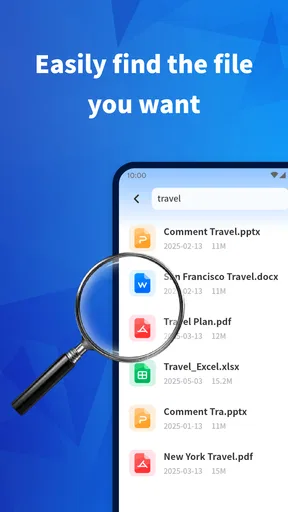
- Useful search helps locate words or phrases across lengthy documents.
- Supports smooth zooming for detailed charts
- forms
- and scanned pages.
- Simple interface is approachable for users who only need basic PDF tools.
Cons
- Some advanced editing and annotation features may require a paid upgrade.
- Large or image-heavy PDFs can take longer to load on older devices.
- The app may offer fewer cloud integrations than full office suites.
- Scanned documents may not support text selection without OCR processing.
- Free use may include advertisements or upgrade prompts.
FAQs for PDF Reader Point
What is PDF Reader Point and what can I use it for?
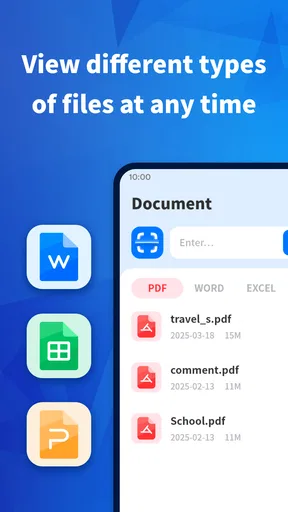
PDF Reader Point is designed for opening, reading, and managing PDF documents on a mobile device. After installing it, users can typically browse files stored on their phone, access recently opened documents, and read PDFs without needing a separate desktop computer. It may be useful for study materials, work documents, manuals, forms, ebooks, and other files that use the PDF format.
Does PDF Reader Point support offline PDF reading?
Yes, PDF Reader Point is primarily intended for viewing PDF files that are already saved on your device, so reading can generally be done without an active internet connection. Internet access may still be required for downloading documents from email, cloud storage, or a website first. Offline availability can depend on where the file is stored and whether the app supports that storage location.
What reading and document-management features are available?
The app focuses on practical PDF reading tools, such as page navigation, zoom controls, scrolling, and access to recently opened documents. Depending on the version and device, it may also provide search, bookmarks, file sorting, sharing, or basic organization options. Users should check the current app listing because available features can vary after updates and between Android and iOS versions.
Is PDF Reader Point free, and does it include advertisements or in-app purchases?
PDF Reader Point may be available as a free download, but the exact business model can depend on the platform, region, and current release. Some versions of PDF reader apps display advertisements or offer optional paid features, such as removing ads or unlocking advanced tools. Before downloading, review the store page for pricing, subscriptions, advertising information, and any listed in-app purchases.
Is PDF Reader Point safe for opening private or confidential documents?
Users should review the app’s permissions and privacy policy before opening sensitive files. A PDF reader may request access to device storage or files so it can locate and display documents, but unnecessary permissions should be treated carefully. Avoid using unfamiliar apps for highly confidential material unless their developer, privacy practices, update history, and data-handling disclosures are clear and trustworthy.


